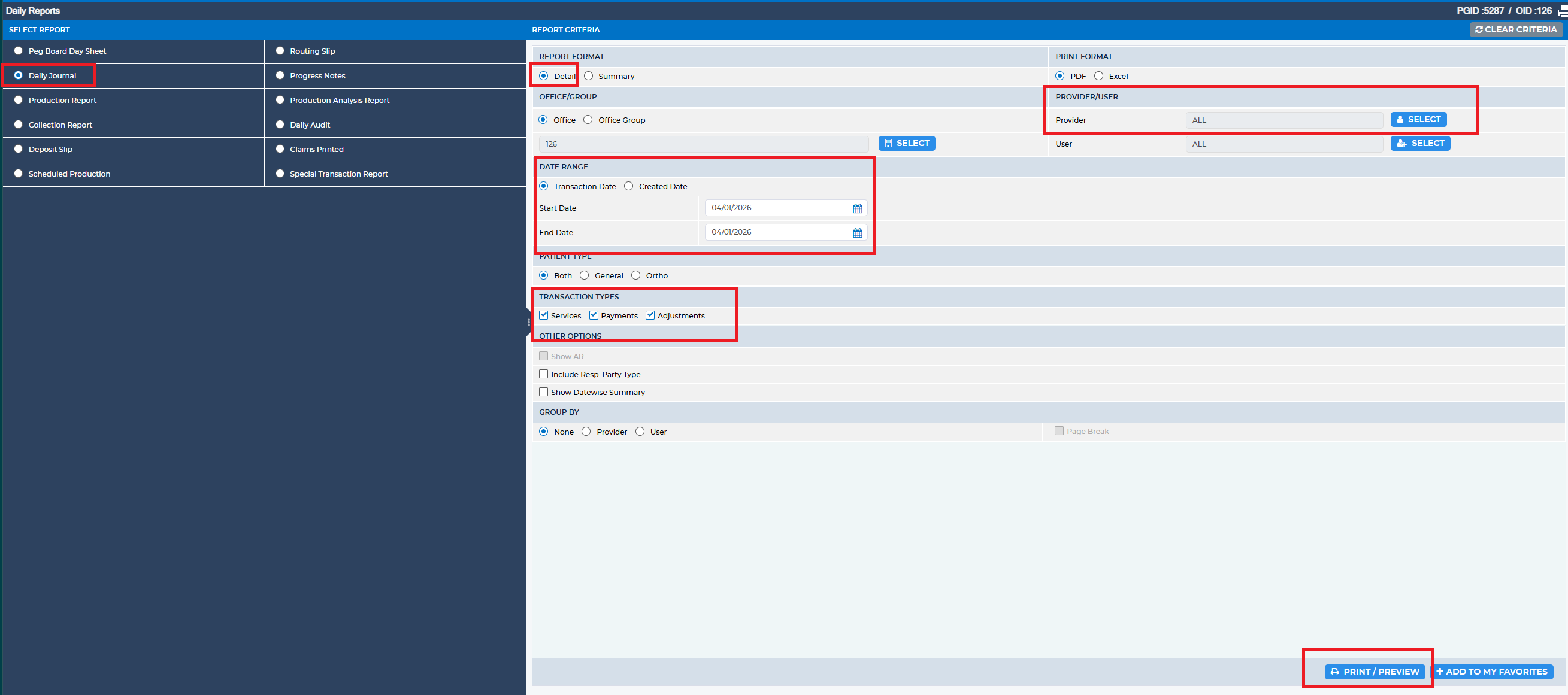
The Daily Journal by Provider (Detailed) report is used to review provider activity for a selected date. It identifies providers with charges on that day, verifies the services performed by each provider, and displays all transactions posted to the ledger.
To access this report, navigate to:
Reports > Daily Reports > Daily Journal
Reports > Daily Reports > Daily Journal
In the Report Criteria section, ensure the following fields are completed:
- Report Format: Select Detail
- Provider: Choose the specific provider(s) for whom you are running the report
- Date Range: Enter the appropriate Start and End dates
- Transaction Types: Select All or specify the relevant transaction types
Note: The amount shown in the report does not necessarily indicate that the full payment was allocated to the selected provider.
Was this article helpful?
That’s Great!
Thank you for your feedback
Sorry! We couldn't be helpful
Thank you for your feedback
Feedback sent
We appreciate your effort and will try to fix the article