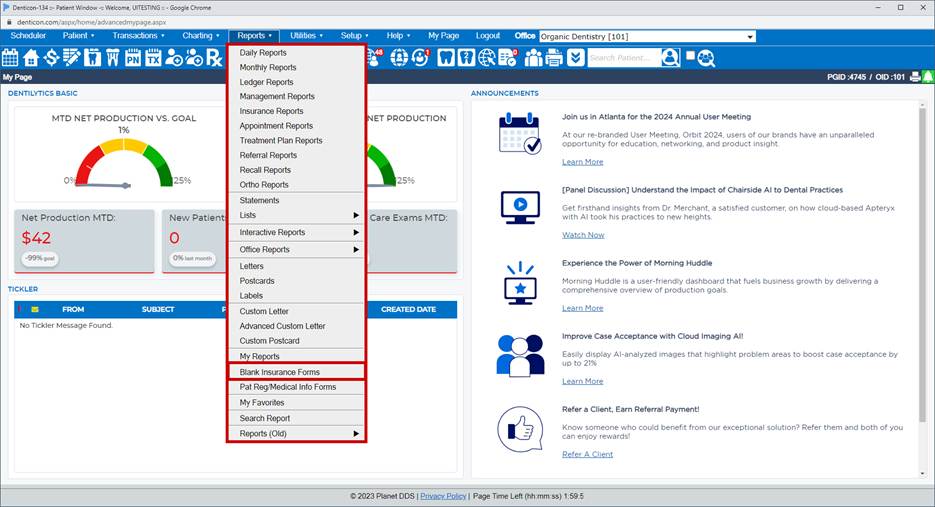
To make a claim for a situation such as this is to paper-print a claim through reports/blank insurance forms:
- access the patient record
- click reports/blank insurance forms
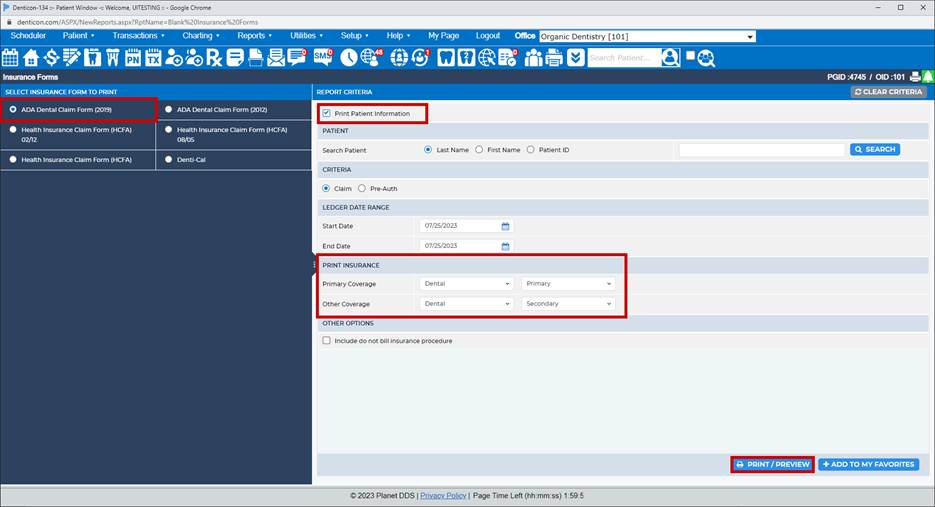
- click the box for "Print Patient Information"
- type the patient's last name, and click the Search button
- use the calendar icons to change the dates, ensure the DOS date(s) are in the From and Through fields
- since you've got the proper insurance plans in the proper places (Primary, Secondary), the "Print Insurance" section should be correct
- Print/Preview
- Denticon suggests that you click the OK button to add a patient note. By doing so, you will have an entry in the Patient Notes that a claim was printed; there will not be a claim in the ledger to post payment toward. Instead, when the insurance money comes in, the insurance payment made through Transactions/Insurance Payment will go toward "Previous Balance."
Was this article helpful?
That’s Great!
Thank you for your feedback
Sorry! We couldn't be helpful
Thank you for your feedback
Feedback sent
We appreciate your effort and will try to fix the article