Clearing Google Chrome Cache
1. Open Google Chrome
Locate and launch the Google Chrome browser on your computer.
2. Access Chrome Settings
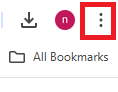
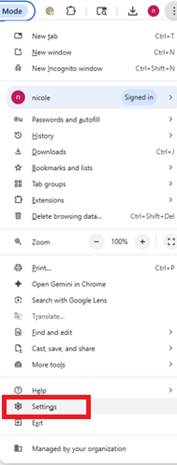
Click the three vertical dots (More) icon in the top-right corner of the Chrome window. This will open a dropdown menu. From this menu, select "Settings."
3. Navigate to Privacy and Security
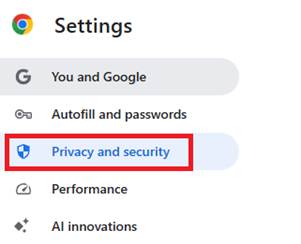
In the Settings tab, look for "Privacy and security" in the left-hand navigation pane and click on it.
4. Open Clear Browsing Data
Under "Privacy and security," click on "Clear browsing data."

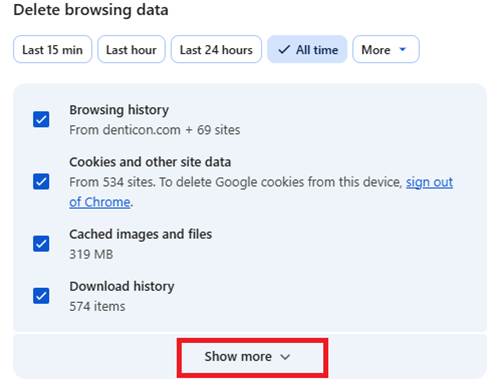
5. Select Time Range and Data Types
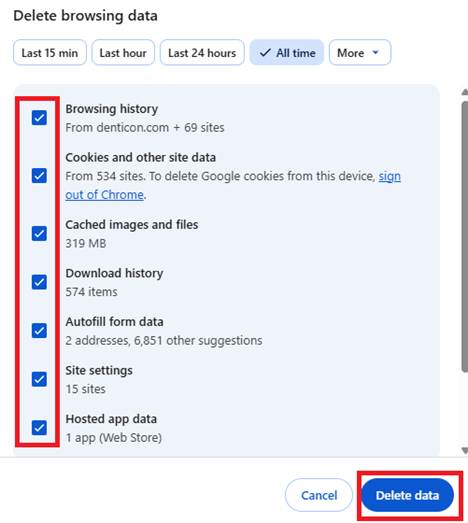
A pop-up window titled "Clear browsing data" will appear.
- Time range: From the dropdown menu, select the desired time range for clearing data. Options include "Last hour," "Last 24 hours," "Last 7 days," "Last 4 weeks," and "All time." For a comprehensive clear, "All time" is recommended. Select the “More” dropdown and click on “All Time”
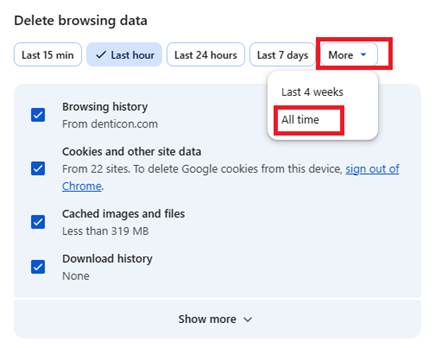
- Data types: Ensure that "Cached images and files" is checked. You can also choose to clear "Browsing history" and "Cookies and other site data" if desired, but for simply clearing the cache, only "Cached images and files" is essential.
Was this article helpful?
That’s Great!
Thank you for your feedback
Sorry! We couldn't be helpful
Thank you for your feedback
Feedback sent
We appreciate your effort and will try to fix the article